Explore
Trial AccessFree
- 7 Days Limited Access
- Learning & Partner Routes
- Markets Hub & Dashboard - Limited

Structured intelligence for informed market decisions.
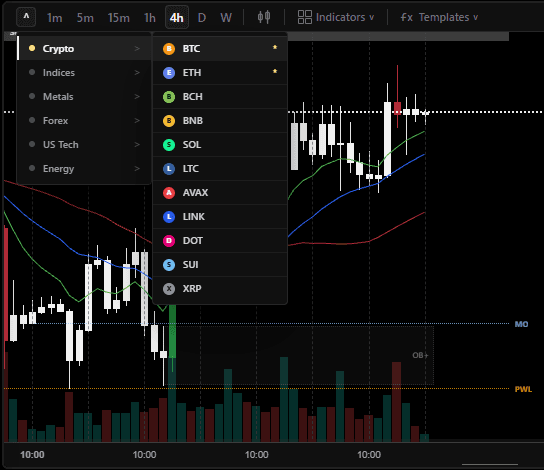
Market Index Coverage
Spot and perpetual markets, asset rotation, funding, liquidity, and exchange flow.
Index breadth, sector leadership, earnings pressure, and relative performance.
Gold and silver, dollar sensitivity, macro conditions, and session structure.
Major pairs, rate expectations, session cycles, and relative currency strength.
Membership Tiers
| Features | ExploreTrial Access | EssentialCore terminal | ExpertApplication only |
|---|---|---|---|
| Charting Workspace | |||
| Markets Hub and Dashboard charts | |||
| Internal multi-chart workspace | |||
| Live candlestick price cadence | 1 sec | Up to 250 ms | Up to 250 ms |
| Candle volume reconciliation | 60 sec | Up to 1 sec | Up to 1 sec |
| Single and multi-chart layouts | 19 | 19 | Custom |
| Charts per workspace | 4 | 4 | Custom |
| Timeframes available | 7 | 7 | Custom |
| Crypto, U.S. tech, and index markets | |||
| Metals, forex, and energy markets | |||
| Searchable markets across all groups | |||
| Independent symbols and timeframes per chart | |||
| Pair, interval, crosshair, and time-range synchronization | |||
| Volume synchronization and chart-view reset | |||
| Interactive pan, zoom, crosshair, and price/time scales | |||
| Sessions, moving averages, OB / FVG, and volume controls | |||
| Demand & Supply, reaction, key-level, and Pivot S&R overlays | |||
| Indicators active per template | 9 | 9 | Custom |
| Saved indicator templates | 7 | 7 | Custom |
| Saved chart layouts | 7 | 7 | Custom |
| Account-scoped workspace state | |||
| Fullscreen charts and PNG snapshots | |||
| Adaptive mobile layouts and chart-height control | |||
| Custom chart layouts, indicators, and workspace configuration | Apply | Custom | |
| Markets Hub | |||
| Live session status, progress, and local / UTC clock | |||
| Current-chart context and intelligence selector | |||
| Internal multi-chart charting workspace | |||
| Cross-asset pair selection across six market groups | |||
| Crypto Futures discovery and charting | |||
| Crypto Futures, Global Macro, and NAS100 watchlists | |||
| Top Stories market news and economic calendar | |||
| Upcoming events, data releases, and importance filters | |||
| Market-context video search and player | |||
| Third-party market widgets, links, and attribution | |||
| Dashboard Intelligence | |||
| Live session and context statistics | |||
| Four-market dashboard for BTC, NAS100, XAU, and USDJPY | |||
| Per-market chart and intelligence pairing | |||
| Shared timeframe, indicator, and synchronization controls | |||
| Crosshair, time-range, and volume synchronization | |||
| Six selectable Theater intelligence views | |||
| Agreement Graph, Decision Matrix, and Regime Trajectory | |||
| BTC Footprint / CVD, Multi-Horizon Zones, and Execution Bubbles | |||
| Saved widget choices and restore-default controls | |||
| Custom dashboard intelligence review | Apply | Custom | |
| Toolkit | |||
| Crypto and stock heatmaps | |||
| Crypto and stock screeners | |||
| Market breadth, sector, and relative-performance views | |||
| Interactive third-party analysis widgets | |||
| Economic calendar with country and importance filters | |||
| Top Stories market-news timeline | |||
| Risk-planning calculator | |||
| Position size, margin, loss, target, and reward / risk outputs | |||
| Four-stage workflow board | |||
| Workflow destination actions | |||
| Custom workflow design | Apply | Custom | |
| Monitor | |||
| Activity Flow and live segment read | Core | Deep | |
| Activity weightage, context contribution, and freshness state | Core | Deep | |
| Minimum-notional filtering for direct futures prints | |||
| Combined MEXC, Binance, and Bybit trade flow | Core | Deep | |
| Trade Flow and Large Print Intensity | Core | Deep | |
| CVD, open interest, funding, and depth context | Core | Deep | |
| Price Action behaviour for NAS100, XAU, and USDJPY | Core | Deep | |
| Tick-activity participation for Price Action markets | Core | Deep | |
| Liquidation feed and imbalance context | Core | Deep | |
| Liquidity Target Zones | Core | Deep | |
| Footprint, absorption, aggression, and exhaustion | Core | Deep | |
| Session snapshots and saved Monitor statistics | Core | Priority | |
| Custom Monitor configuration and expert flow review | Apply | Custom | |
| Confluence | |||
| Four-market Confluence Theater | |||
| BTC, NAS100, XAU, and USDJPY market tabs | |||
| Market summary and command panel | |||
| Source 1 chart-template evidence | |||
| Source 2 Activity Flow and Price Action evidence | |||
| Fixed source authority and evidence contribution | |||
| Agreement Graph | |||
| Decision Matrix | |||
| Regime Trajectory | |||
| Risk Stack and trigger-path evidence | |||
| BTC Footprint / CVD, Multi-Horizon Zones, and Execution Bubbles | Core | Deep | |
| Custom setup review and scenario rehearsal | Apply | Custom | |
| Chat Room | |||
| Live Main Floor member room | |||
| Text, reactions & media sharing | |||
| Online presence, handles, and avatars | |||
| Live market reads, trade setups, and execution | |||
| Pinned notices, reporting, and moderated messages | |||
| Scripts | |||
| Seven detailed downloadable Pine chart overlays | |||
| TradingView Pine v5/v6 source | |||
| Versioned .pine and .txt delivery | |||
| Setup guides, configuration details, and usage notes | |||
| Sessions, structure, averages, and level overlays | |||
| TradingView Pine strategy development | Expert only | Experimental | |
| MT5 executable strategy development | Expert only | Experimental | |
| Freqtrade research and implementation notes | Expert only | Experimental | |
| DIY Strategy Builder reference example | Expert only | Experimental | |
| Custom scripts, indicators, and strategy experiments | Apply | Custom | |
| Learning | |||
| Foundation and platform basics | |||
| Wallets, transfers, trading pairs, and execution controls | |||
| Risk, leverage, position size, margin, and liquidation | |||
| Price Action and structure modules | |||
| Order Flow and market-phase modules | |||
| Global session-cycle modules | |||
| Order Block and Fair Value Gap modules | |||
| Demand, Supply, reaction, and key-level modules | |||
| Chart examples and workspace-linked study | |||
| Guided desk workflow and playbook training | Apply | Custom | |
| Downloads | |||
| Curated referral links with disclosure | |||
| Curated wallet and exchange routes | |||
| Broker and prop-firm routes | |||
| Copy controls with provider and source labels | |||
| TradingView and MetaTrader platform links | |||
| Paper Trading | |||
| $100,000 account-scoped virtual portfolio | |||
| Cash holdings and 1x directional cTrader simulation | |||
| Searchable markets across all groups | |||
| On-demand provider bid/ask quotes | |||
| Live position marks and simulated P&L | |||
| Account-scoped order history and portfolio reset | |||
| Up to three positions with combined exposure capped at 25% of virtual equity | |||
| Runtime & Workspace | |||
| Server-backed market runtime continuity | Core | Core | Deep |
| Compact shared intelligence snapshots | Core | Core | Core |
| Freshness, health, and stale-state labels | |||
| Account-scoped layouts, templates, and preferences | |||
| Private member workspace ownership | |||
| Protected route, feature, tab, and API access | Enforced | Enforced | Enforced |
| Manage Account | |||
| Manage Account center | |||
| Profile, handle, and account avatar | |||
| Membership, access, and billing overview | |||
| Access duration | 7 days, then Library | Monthly | Custom terms |
| Payment-method verification | Required, no charge | Required | Essential verified |
| Billing management | Stripe portal | Stripe portal | Via Essential |
| Automatic renewal | Optional | Optional | Follows Essential |
| Admin approval activation | Required | After payment | After application |
| Recovery and browser session control | |||
| Timezone and default preferences | |||
| App installation options | |||
| Support access | Standard | Standard | Priority |
| Expert application path | Requires Essential | Apply | Active |